
Is your website quietly letting you down? Maybe it looks dated next to your competitors, loads slowly on phones, or simply is not bringing in enquiries the way it used to. When business owners reach this point, developers usually offer two options: a redesign or a rebuild.
They sound almost the same, but they are very different projects with different costs, timelines, and results. Pick the wrong one and you could spend money on a fresh coat of paint when the foundation is cracked, or tear down a perfectly good house just to change the curtains.
This guide explains website redesign vs rebuild in plain language, so you can decide what your business actually needs.
What Is a Website Redesign?
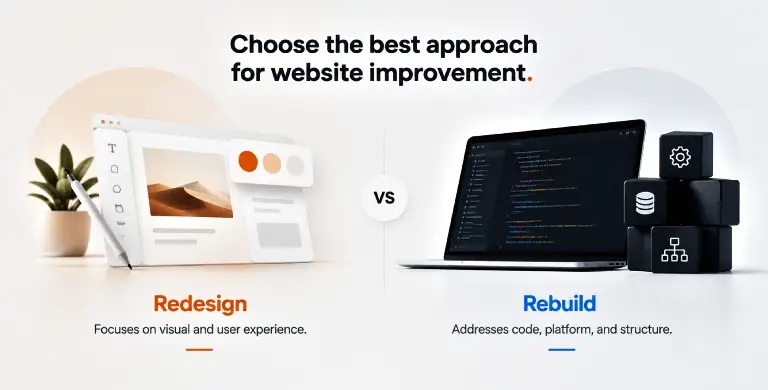
A website redesign changes how your site looks and feels without replacing the technology underneath it. You keep the same platform, the same core structure, and usually most of your existing content. What changes is the visual layer and the user experience.
A typical redesign might include:
- A new colour palette, fonts, and images that match your current brand
- Cleaner page layouts that make information easier to scan
- Simpler navigation so visitors find what they need faster
- Stronger calls to action on key pages
- Better layouts for mobile screens
Think of it like renovating a shop. The building stays the same, but the shelves, lighting, and signs are updated so customers enjoy the visit and buy more.
What Is a Website Rebuild?
A website rebuild starts from the ground up. The code, the content management system, the database, and often the hosting are replaced. The finished site might look similar to the old one or completely different, but under the surface everything is new.
A rebuild usually involves:
- Moving to a new platform (for example, from an old custom system to WordPress or Shopify)
- Writing fresh, clean code that follows current standards
- Rethinking the site structure and how pages connect
- Adding new features such as booking systems, customer portals, or CRM connections
- Setting up faster, more secure hosting
Going back to the shop example, a rebuild means knocking down the old building and putting up a new one designed for how you run your business today.
Website Redesign vs Rebuild: The Key Differences
| Factor | Redesign | Rebuild |
| What changes | Look, layout, user experience | Code, platform, structure, and design |
| Timeline | A few weeks | Several weeks to a few months |
| Budget | Lower | Higher |
| Risk to SEO | Low if URLs stay the same | Higher, needs careful planning |
| Best for | Sites that work well but look or feel old | Sites held back by their technology |
The easiest way to remember it: a redesign fixes what people see, while a rebuild fixes what makes the site work.
Signs Your Business Needs a Website Redesign
A redesign is often the right call when the engine runs fine but the presentation is the problem. Look out for these signs.
Your brand has changed. If you have a new logo, new services, or a new target audience, your website should reflect that.
Visitors leave quickly. High bounce rates on key pages often point to confusing layouts, weak headlines, or unclear next steps.
The site looks dated. Design styles move fast. A site that looked sharp five years ago can now make a business seem out of touch.
Traffic is healthy but sales are not. If people arrive but do not call, book, or buy, the issue is often design and messaging rather than technology. This is where conversion rate optimisation and a focused redesign work well together.
Your team can still update the site easily. If your content management system is stable and simple to use, there is little reason to replace it.
Signs Your Business Needs a Website Rebuild
A rebuild makes sense when the problems sit deeper than the surface. Watch for these red flags.
The site is painfully slow. Heavy code, old plugins, and poor hosting drag down speed no matter how nice the design is. Google measures real user experience through Core Web Vitals, and a slow site can hurt both rankings and sales.
It breaks on mobile. If your site was never built to adapt to different screen sizes, patching it for phones rarely works well.
Security is a worry. Old platforms that no longer receive updates are an open door for hackers.
Simple changes need a developer. If editing a price or adding a blog post means waiting on someone technical, your platform is slowing your business down.
You need features the current system cannot handle. Online payments, multiple languages, booking tools, or links with your sales software often call for a fresh build.
Your platform is no longer supported. Once the technology behind your site reaches the end of its life, a rebuild stops being optional.
Questions to Ask Before You Decide
Before you commit budget, sit down with your team and answer these honestly:
- What is the main problem we want to solve: looks, speed, or features?
- Can our current platform support where the business is heading over the next three years?
- How much of our existing content is still accurate and useful?
- What does our analytics data say about where visitors drop off?
- How much interruption can we handle while the work is happening?
If most answers point to visual or messaging issues, lean towards a redesign. If they point to speed, security, or missing features, a rebuild is likely the smarter long term choice.
Do Not Forget About SEO
Whichever route you choose, protect the search visibility you have already earned. This is where many projects go wrong.
With a redesign the risk is smaller, but changing headings, removing content, or altering page URLs can still affect rankings. With a rebuild the risk is higher, because URLs, site structure, and technical settings often change all at once.
A few basics help:
- Map every old URL to its new version and set up 301 redirects
- Keep your best performing content, and improve it rather than delete it
- Test the new site on a staging copy before launch
- Submit an updated sitemap to Google Search Console once you go live
Google’s own guide to moving a site with URL changes is worth reading before any major change. Working with a team that understands both development and search engine optimisation saves a lot of stress later.
Common Mistakes to Avoid
Choosing based on looks alone. A beautiful site that takes eight seconds to load will still lose customers.
Rebuilding when a redesign would do. Not every problem needs a new platform. A smart redesign can deliver faster results for a fraction of the cost.
Skipping user research. Your opinion of the site matters less than how customers actually use it. Heatmaps, session recordings, and simple feedback show what really needs fixing. The usability research from Nielsen Norman Group is a great place to start.
Launching without tracking. If you cannot measure results after launch, you will never know whether the investment paid off.
So, Which One Does Your Business Need?
Here is the short answer. Choose a redesign if your website works well technically but looks old, confuses visitors, or fails to turn traffic into leads. Choose a rebuild if your site is slow, insecure, hard to manage, or unable to support the features your business needs to grow.
Still unsure? That is completely normal. A proper website audit will show whether your problems are on the surface or deep in the foundations.
Get Honest Advice From Skyo
At Skyo, we help businesses across the UAE and GCC make this decision with confidence. Our team offers both website redesign and website development services, built around one goal: turning your visitors into paying customers. We start by reviewing your current site, then recommend the option that fits your goals and budget, not the one that sounds most impressive.
Wondering whether your website needs a redesign or a full rebuild? Talk to the Skyo team today and get a clear, honest answer.